
5 Reasons Why PlantPredict is the Easiest-to-Use Utility-Scale Solar Software
Last updated: December 1, 2025
In utility-scale solar development, efficiency isn’t just an advantage, it’s absolutely essential. From concept to commissioning, teams are juggling intricate designs, changing data, and tight timelines, all while ensuring everything is accurate and financially viable. Yet many software tools in this industry are either too fragmented or overly complicated, creating more obstacles than removing them.
That’s where PlantPredict comes in handy. Designed specifically for professionals in utility-scale solar, it merges robust modeling features with a user-friendly, cloud-based platform that fosters collaboration, speed, and confidence. Whether you’re an engineer, analyst, or developer, PlantPredict simplifies the process of predicting performance, optimizing designs, and turning solar projects into reality.
Benefit #1: Modern User Interface: Hours, not weeks to proficiency

PlantPredict’s modern user interface is designed for speed, clarity, and minimal onboarding friction. Unlike complex desktop-based tools, PlantPredict’s interface is not just clean, it’s modular and built for utility-scale solar workflows.
Whether you’re a seasoned engineer optimizing DC/AC ratios or a student intern exploring terrain constraints, it’s easy to adapt to the PlantPredict UI without overwhelming yourself. Inputs are logically grouped, tooltips are context-aware, and simulations provide immediate visual feedback. This means new users can go from login to layout optimization in hours, not weeks.
The result is faster project cycles, fewer training bottlenecks, and more time spent on engineering rather than software troubleshooting. Let’s take a look at the User Interfaces of PlantPredict, Design Pro, Terrain Pro, and Voltage Pro below.
PlantPredict User Interface
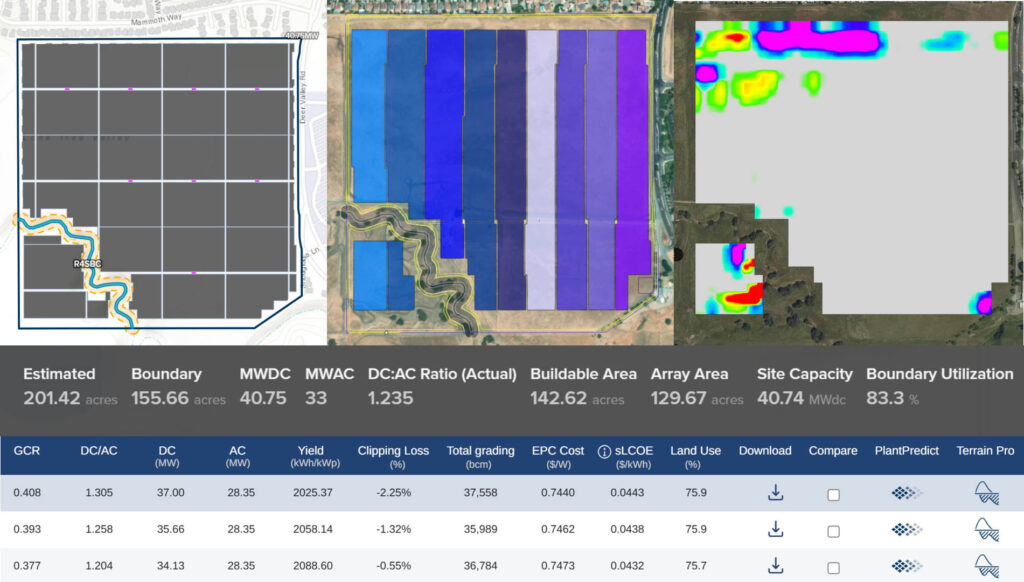
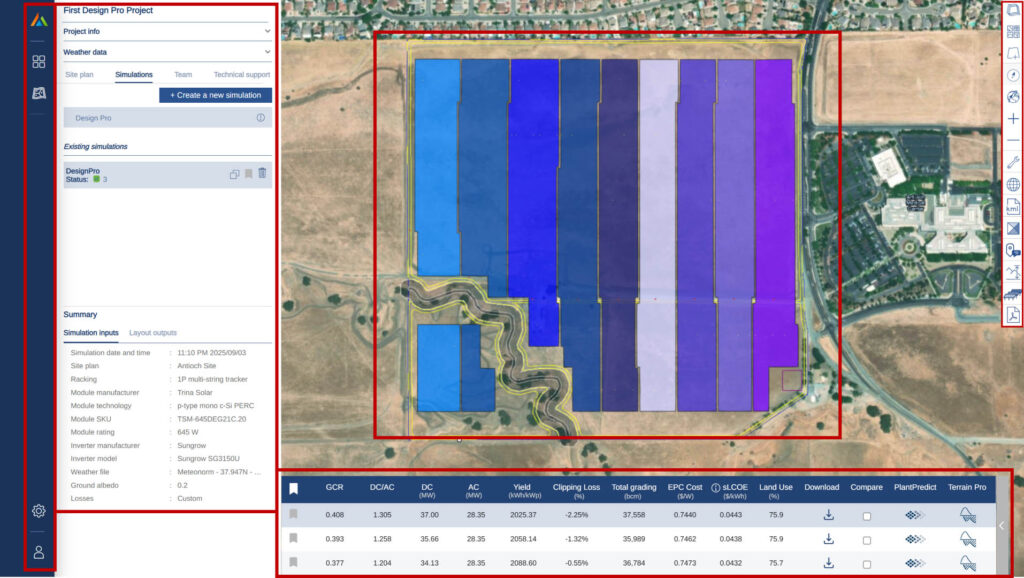
PlantPredict is a tool used to assess site constraints and energy yield for utility-scale solar projects. The interface features a generic options bar and input panel on the left side of the screen. The right side includes a toolbar with modification options. In the center, you will find a visual representation of the site layout and constraints generated from your inputs. The outputs from the simulation appear at the bottom of the screen, and you can download various results from the top right corner.

Design Pro User Interface
The Design Pro tool creates layouts for Utility-Scale Solar projects, along with estimates of energy production and financial costs. On the left side of the screen, you will find the input panel and the generic settings panel. The options and modification toolbar is located on the right side. In the center of the screen, a simulated layout is displayed, with the scenario results shown at the bottom.
Terrain Pro User Interface
Terrain Pro is designed for calculating earthwork quantities for utility-scale solar projects. In the Input Panel at the top left, you can either select a tracker type or input parameters to run a simulation. Project details are displayed in the bottom left corner of the screen. In the example provided, the project layout is derived from a Design Pro simulation located in Antioch, California, covering an area of 60.6 hectares. The visual display in the center features an earthwork heatmap, which can also be switched to contour view or pile view. On the right side, you will find the results and the option to export them in various formats.

Voltage Pro User Interface
Voltage Pro is designed to optimize string size calculations. On the left side, you can click on various input parameters, including Weather Data, PV Module, Module Mounting, Inverter, and Settings, to view or update the inputs. The final option, Results, displays the string size calculation based on both the Linear and Advanced methods.

Benefit #2: Cloud-Based Solar Modeling: Say Goodbye to Outdated Desktop Software

Legacy desktop software has served the industry for years, but it feels outdated. The software resides on local machines, collaboration means sending files via email, and updates require manual downloads.
In today’s fast-paced solar development environment, that model is no longer sustainable. PlantPredict eliminates the headaches of these legacy desktop tools. Users can log in from anywhere and access the latest modules, weather datasets, and company project files.
In a world where cloud tools dominate and time is money, PlantPredict offers a more innovative, faster, and modern way to model solar energy projects. It’s built for how today’s teams actually work—collaboratively, remotely, and fast-paced—to deliver results quickly.
Desktop vs Cloud-Based Solar Software: A Strategic Comparison
| Capability | Desktop-Based (e.g., PVsyst) |
Cloud-Based (e.g., PlantPredict) |
|---|---|---|
| Version Control | Multiple local versions lead to inconsistent results and time-consuming reconciliation. | Always on the latest version, no manual updates, no version mismatch. |
| Software Updates & Licensing | Manual downloads, license key management, and machine-specific installs. | Automatic updates and license-free access via browser login. |
| Collaboration | No real-time collaboration; teams rely on email or shared drives. | Multi-user, real-time collaboration with role-based access control. |
| File Sharing & Compatibility | Risk of corrupted or incompatible files when sharing across machines. | Centralized cloud storage ensures seamless access and zero file corruption. |
| Hardware Dependency | Performance is limited by the local machine's specs, which can cause lags or crashes during large simulations. | Cloud handles heavy simulations, which are fast, stable, and device-agnostic. |
| Automation & API Access | No native API; automation requires complex workarounds or third-party hacks. | Native API enables integration with dashboards, CRMs, and automated workflows. |
| Data Security & Access | Local storage risks data loss, theft, or version overwrite. | Encrypted cloud storage with global access and audit trails. |
| Scalability & Team Onboarding | New team members need local setup, training, and license provisioning. | Instant onboarding via browser. No installs, no IT bottlenecks. |
| Simulation Speed & Uptime | Long runtimes on large projects; downtime tied to local system health. | High-speed cloud simulations with near-zero downtime. |
| Cost of Ownership | Hidden costs in IT support, hardware upgrades, and lost productivity. | Predictable SaaS pricing with lower total cost of ownership over time. |
Benefit #3: Built for Team Collaboration

Utility-scale solar projects rely on effective collaboration among various specialists and organizations, each responsible for a critical aspect of the project. When the right tools are not in place, miscommunication and version-control issues can significantly slow progress and lead to costly mistakes.
PlantPredict simplifies this process by offering a shared workspace where teams can collaborate securely and efficiently at every stage of the project.
- Centralized Project Workspace: Stores all simulations (layout, earthwork, string size calculation, etc…) in one place.
- Shared Data Libraries: PlantPredict provides a vast library of Solar Modules, Inverters, Trackers, and other components accessible to all team members.
- Cloud-Based Accessibility: Team members can log in and collaborate from anywhere, enabling global coordination across time zones and companies. It also helps expedite the onboarding of a new member.
- Seamless Data Sharing: Design Pro simulations can be shared with individuals both inside and outside your company. Additionally, KMZ or PDF reports generated by PlantPredict, Terrain Pro, Voltage Pro, and other tools can be downloaded and shared with others.
- Streamlined Workflow: Civil, electrical, and financial teams can pass projects seamlessly from one stage to the next without losing context or data.
Benefit #4: Solving the Engineering Talent Shortage

Hiring experienced Solar Engineers is a challenge. The demand for solar talent is increasing rapidly, but there are very few professionals available with the necessary modeling expertise and software proficiency. Here are five ways PlantPredict can help you address this talent shortage.
- Training Time Is Drastically Reduced
- Pre-configured inputs & streamlined workflows compress onboarding from weeks to days
- Software documentation and resources by PlantPredict help users grasp the software fundamentals
- Cloud access allows remote training and asynchronous learning
- Junior Staff Can Contribute Faster and Independently
- Intuitive User-Friendly Interface enables entry-level engineers to run simulations and generate reports within hours
- No need to master legacy software quirks or memorize complex workflows
- Includes ready-to-use data libraries and validated system components, enabling users to start modeling immediately without needing to find or verify inputs themselves.
- Senior Engineers Are Freed for High-Impact Work
- Routine modeling tasks can be delegated without compromising quality
- Senior Engineers have easy access to the simulations from Design Pro across the entire company
- Senior Engineers can focus on other crucial aspects of the project, such as strategic design, risk analysis, and stakeholder engagement
- Lower Dependency on Niche Software Expertise
- Eliminates the need for niche software experts to navigate or troubleshoot legacy tools
- Engineers, analysts, and solar professionals can run sophisticated simulations without needing deep software training for PlantPredict
- Reduces bottlenecks and delays in project workflows, enabling smoother and more efficient team collaboration.
- Teams Become More Scalable and Resilient
- Automated batch processing and API integration enable automated simulations and allow teams to manage more projects simultaneously with fewer resources
- Cloud-Based Architecture enables scalability by allowing real-time collaboration across distributed teams and eliminating local installs.
- Expand the number of projects you handle without significantly increasing the size of the engineering team.
With the right utility-scale solar modeling tool, such as PlantPredict, even a typical engineer or analyst can produce accurate and professional results.
Benefit #5: Predict with Confidence, Present with Clarity
In PlantPredict, each module is designed to simulate real-world performance and generate outputs that are bankable, audit-friendly, and presentation-ready.
Whether you’re pitching to investors, submitting for permitting, or handing off to EPC teams, the software delivers clean, structured documentation that speaks the language of decision-makers.
Here’s what you can expect from each tool:
PlantPredict Core Output
1. Site Specific Simulation Result

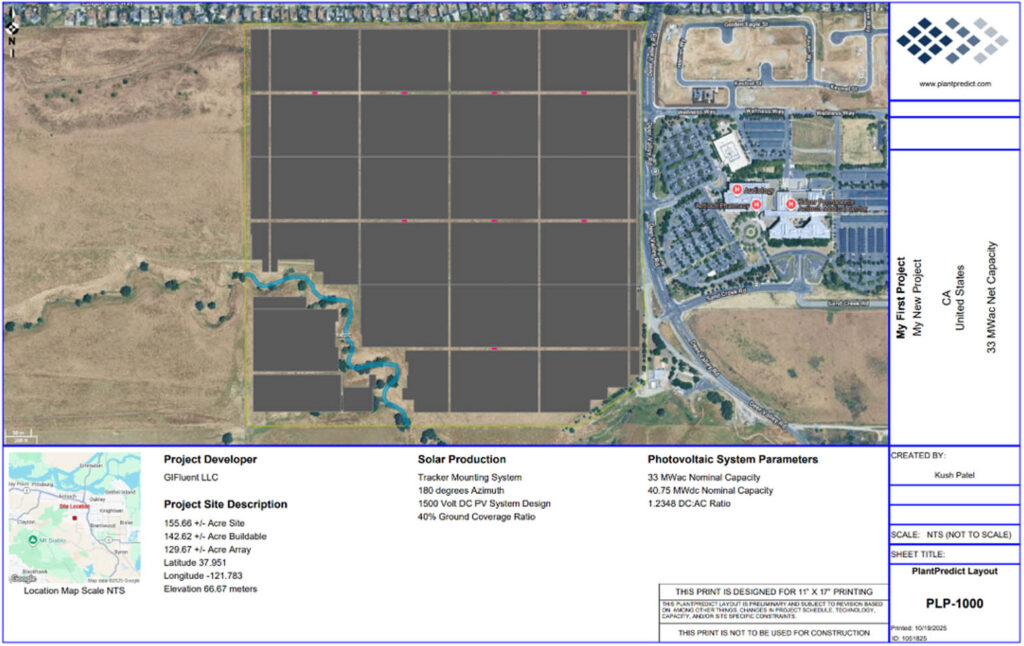
2. 11" x 17" Layout PDF (PLP-1000)
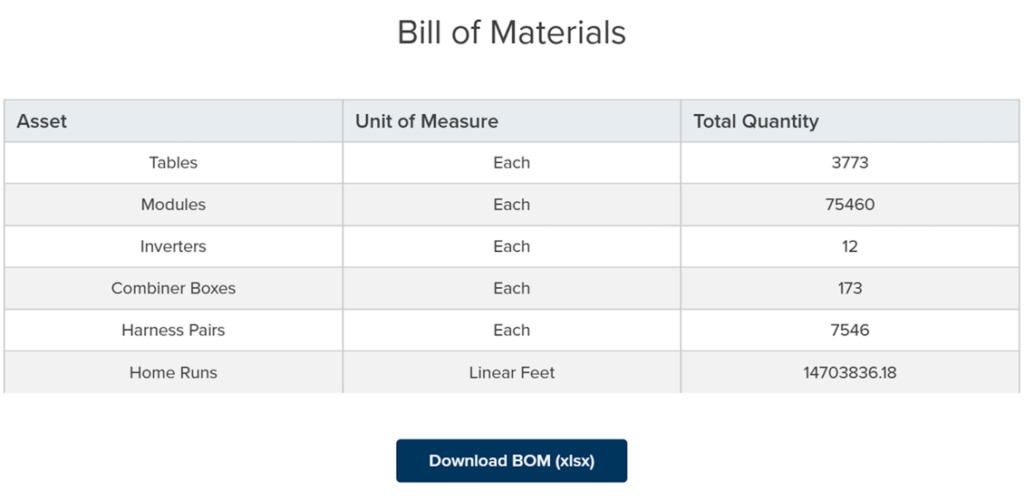
3. Bill of Materials (BOM)
4. Export Options

Design Pro Output
1. Site Specific Simulation Result

2. Array Layout - 11” X 17”
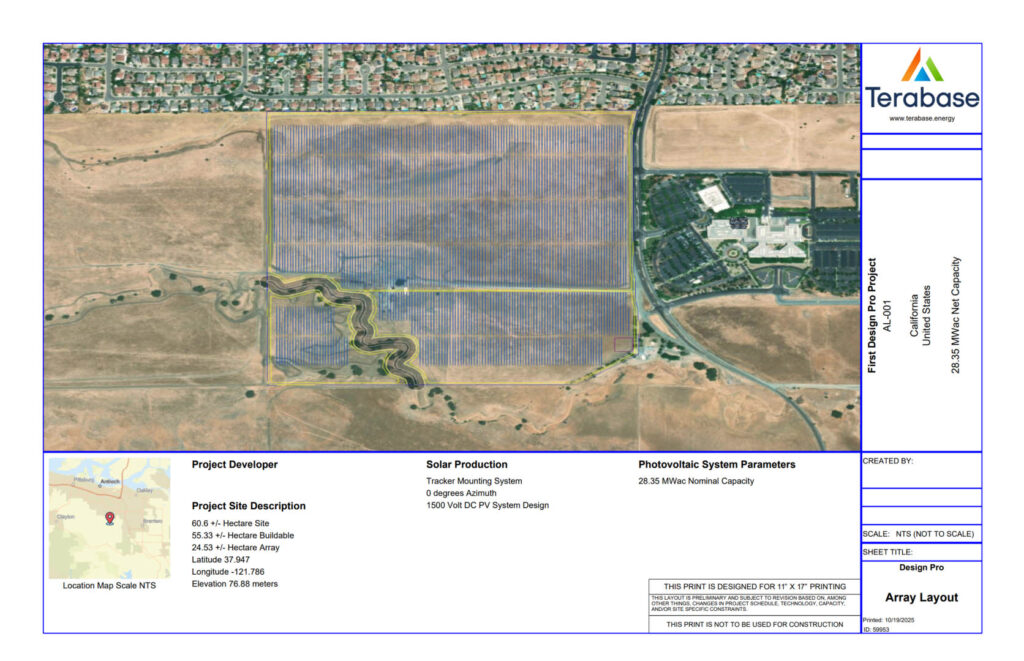
3. Financial Report and KML

Terrain Pro Core Output
1. Earthwork Summary PDF

2. Pile Binning Configuration

3. Download PVC File, Rack Output Data, and DXF File

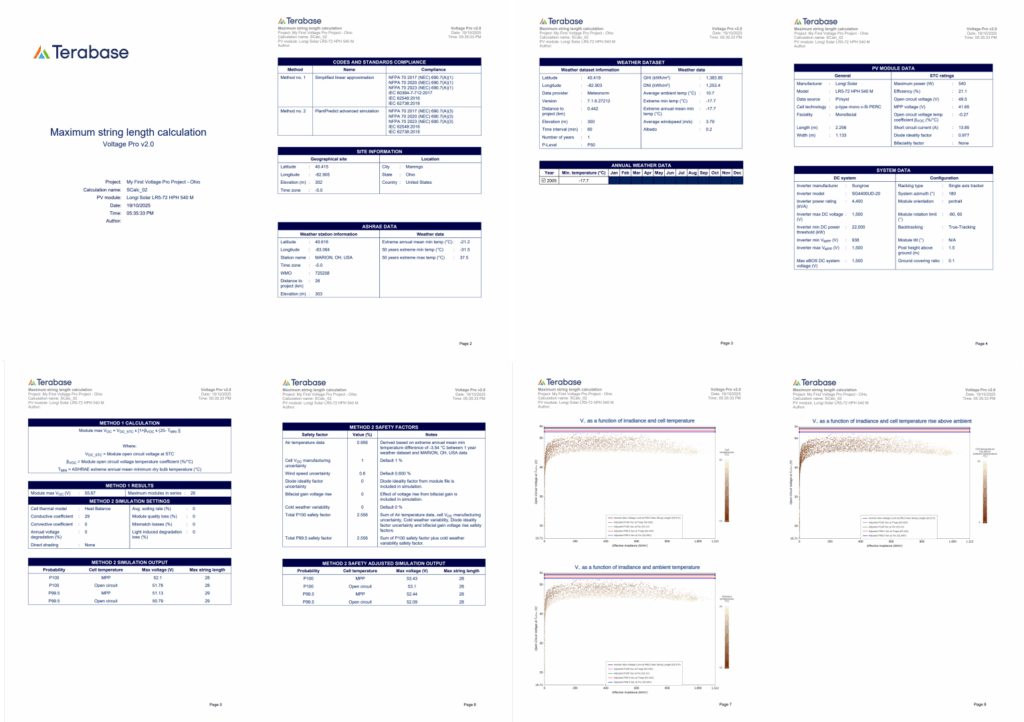
Voltage Pro Core Output
1. Maximum String Length Calculation Report
Why These Outputs Matter
- Bankable & Audit-Friendly: Every report is structured for traceability—inputs, assumptions, and results are clearly documented
- Visually Clean & Exportable: No need for post-processing or manual formatting; PDFs are ready for boardrooms and regulatory filings
- Backed by Real-World Data: Weather files, terrain maps, and PAN/PPM specs ensure simulations reflect actual site conditions—not theoretical models
As the solar industry continues to expand, the need for simplicity and accessibility are becoming just as crucial as precision. Tools that make workflows smoother, boost collaboration, and provide reliable insights allow teams to concentrate on what truly matters—ramping up clean energy production and doing it faster.
PlantPredict is a perfect example of this evolution. By combining user-friendly design, collaborative features, and dependable results, it enables solar professionals from all walks of life to work smarter, not harder—ultimately speeding up the growth of utility-scale solar around the globe.